🚀 Karpenter — Deep Interview Guide (EKS)
🔹 What is Karpenter?
Karpenter is a Kubernetes-native node provisioning system for EKS that launches nodes directly based on pod requirements. It watches unschedulable pods and creates right-sized EC2 instances instantly. It does not depend on Auto Scaling Groups. It is faster and more flexible than Cluster Autoscaler.
🔹 Why Karpenter Was Created
Cluster Autoscaler scales node groups — not pods directly. That causes delays and waste. Karpenter instead provisions exact instance types based on CPU/memory/constraints needed by pending pods. This reduces cost and startup time.
🔹 How Karpenter Works (Real Flow)
- Pod becomes unschedulable
- Karpenter watches scheduler events
- It calculates required resources
- Selects best EC2 instance type from allowed list
- Launches instance directly via EC2 API
- Node joins cluster → pod scheduled
No ASG involved in decision loop.
🔹 Karpenter Core Objects
Provisioner / NodePool (newer API) Defines constraints like:
- instance types
- spot/on-demand
- zones
- CPU/memory limits
- labels/taints
NodeClass (AWSNodeClass) Defines infra config:
- subnets
- security groups
- AMI family
- IAM role
🔹 Karpenter Production Use Cases
- Spiky workloads
- Mixed instance fleets
- Spot-heavy clusters
- Batch + ML workloads
- Cost-optimized scaling
- Fast burst scaling
Bad fit: very static predictable workloads.
🔹 Karpenter Cost Optimization Features
- Instance type flexibility
- Spot-first strategies
- Right-sized nodes
- Consolidation (removes underutilized nodes)
- Bin-packing pods efficiently
Cluster Autoscaler cannot do this level of packing.
🔹 Karpenter Risks / Operational Notes
- Needs correct constraints or it may launch expensive instances
- Must define limits in Provisioner
- Spot interruption handling must be configured
- More powerful = more dangerous if misconfigured
⚖️ Cluster Autoscaler — Deep Interview Guide

🔹 What is Cluster Autoscaler?
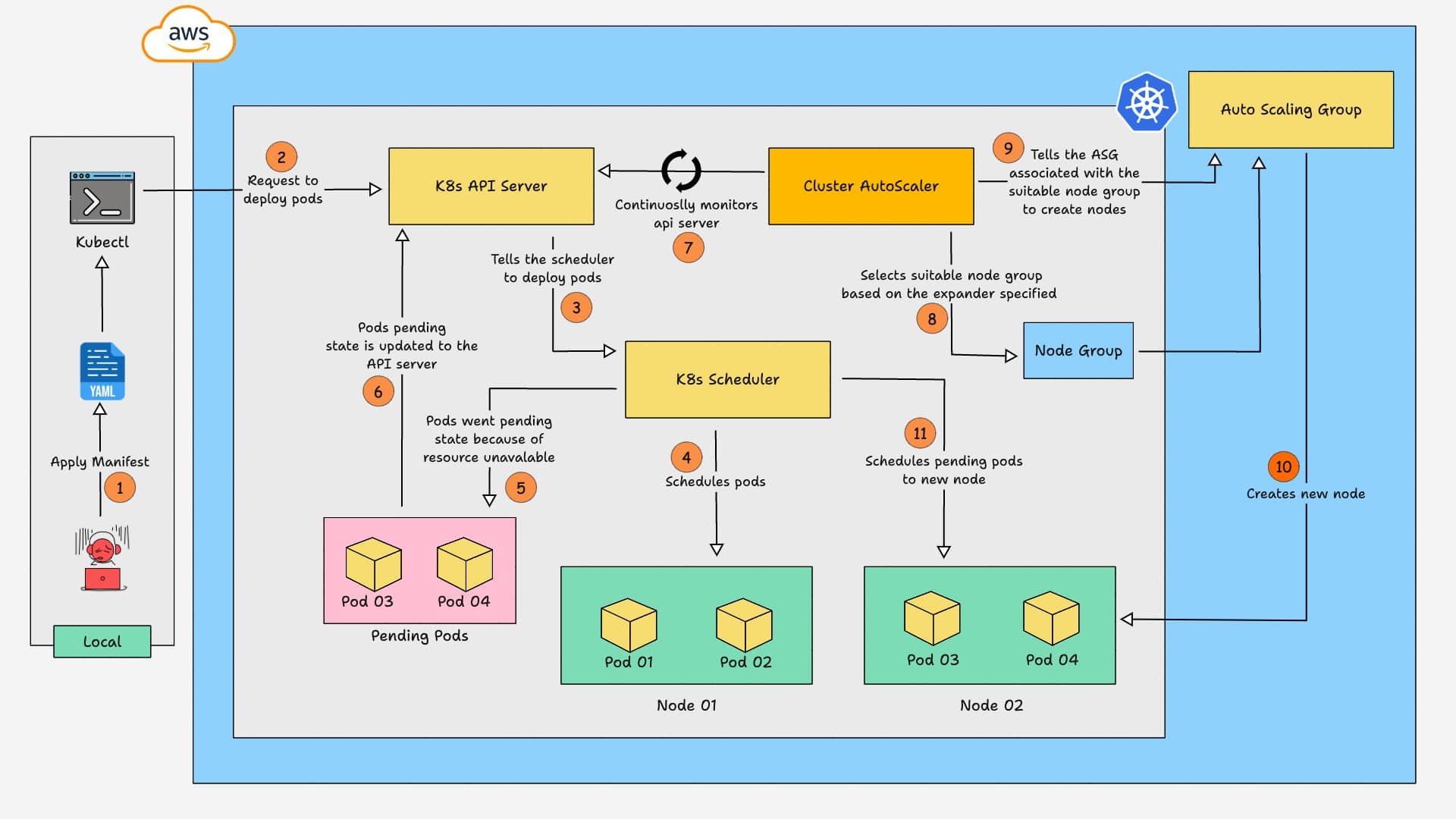
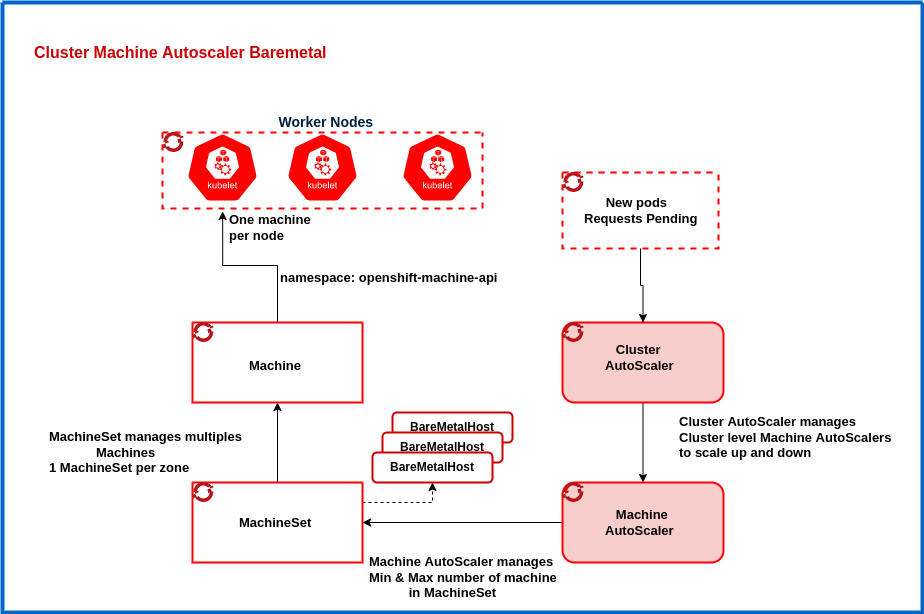
Cluster Autoscaler scales existing node groups (ASGs) when pods are unschedulable. It increases or decreases ASG desired count. It does not create new instance types dynamically.
🔹 How Cluster Autoscaler Works
- Detects unschedulable pods
- Simulates scheduling against each node group
- Picks matching group
- Increases ASG desired capacity
- Waits for node to join
Scaling speed depends on ASG + launch template.
🔹 Cluster Autoscaler Strengths
- Simple model
- Stable and mature
- Easy to reason about
- Good for predictable workloads
- Tight ASG integration
🔹 Cluster Autoscaler Limitations
- Only scales predefined node groups
- Cannot choose new instance types dynamically
- Slower reaction time
- More wasted capacity
- Harder spot optimization
🥊 Karpenter vs Cluster Autoscaler (Interview Table)
| Area | Karpenter | Cluster Autoscaler |
|---|---|---|
| Provisioning | Direct EC2 launch | ASG scale |
| Speed | Faster | Slower |
| Instance choice | Dynamic | Fixed per node group |
| Cost optimization | Strong | Limited |
| Spot handling | Advanced | Basic |
| Complexity | Higher | Lower |
| Best for | Dynamic workloads | Stable workloads |
Interview punchline: CA scales groups. Karpenter scales nodes.
🧱 EKS Node Groups — Full Interview Guide


🔹 What is an EKS Node Group?
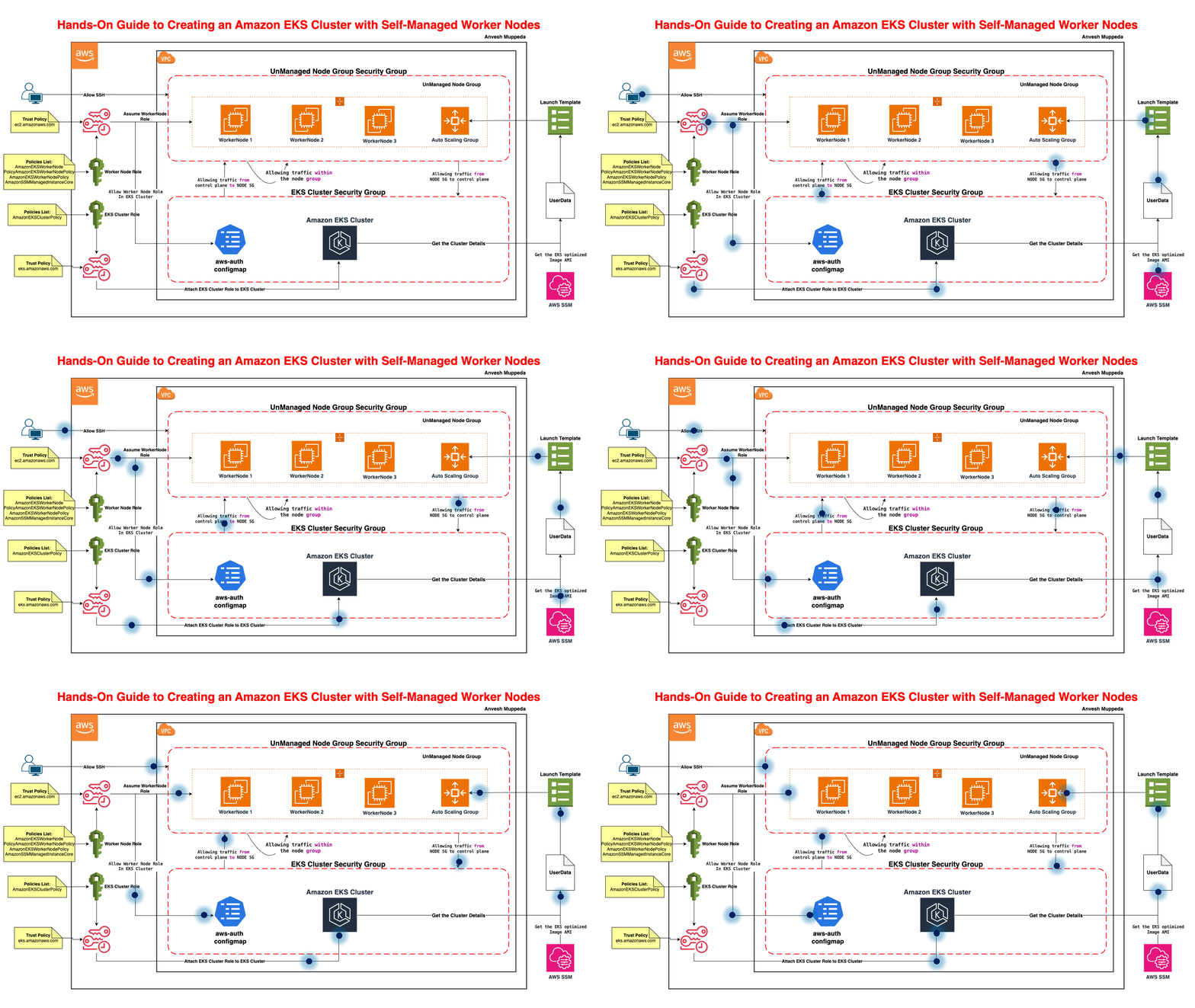
A node group is a set of worker nodes managed together. Backed by an Auto Scaling Group. All nodes share config like AMI, instance type, IAM role.
🔹 Types of Node Groups
✅ Managed Node Group
AWS manages lifecycle and upgrades. Easier operations. Recommended default.
✅ Self-Managed Node Group
You manage ASG + AMI + bootstrap. More control, more work.
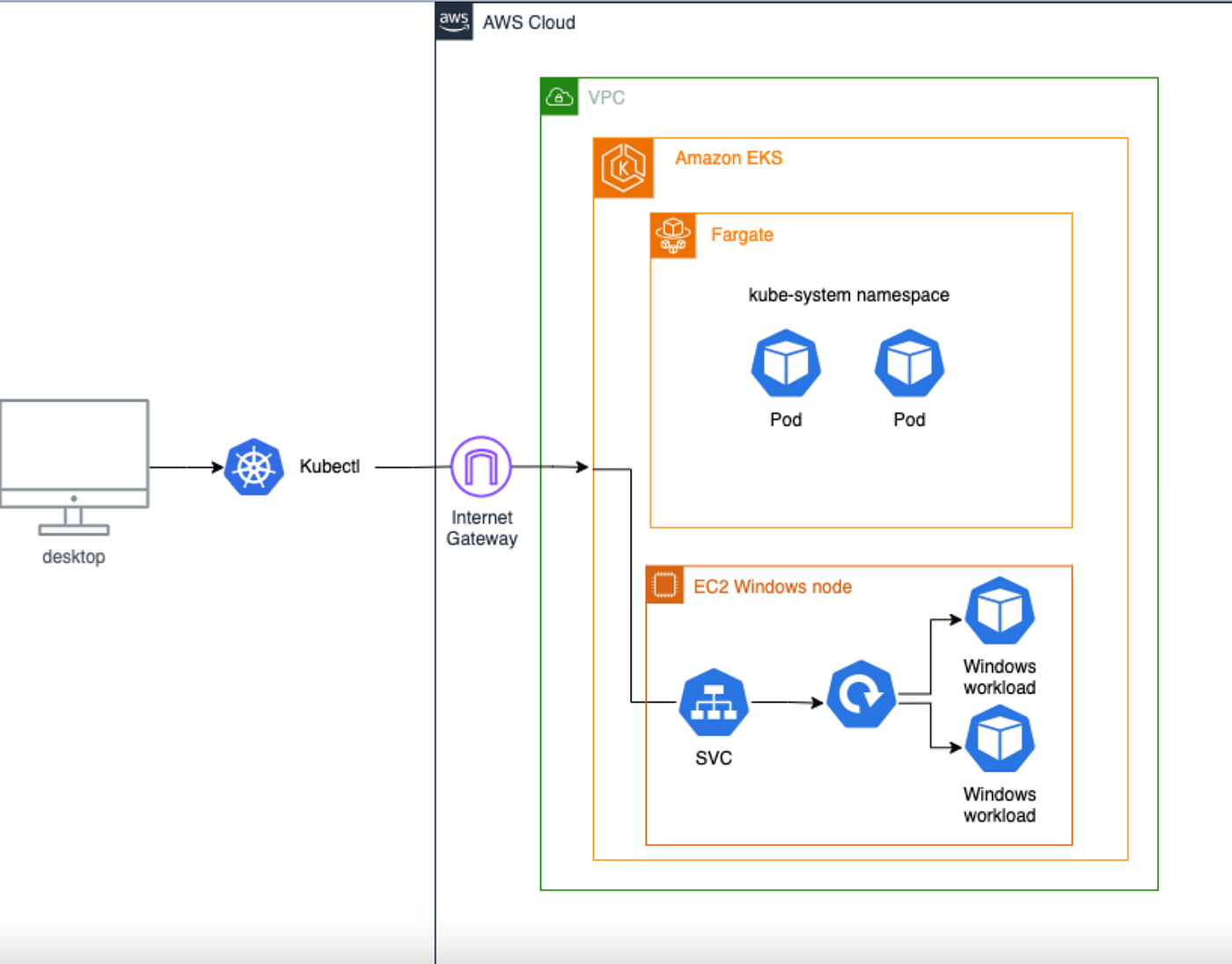
✅ Fargate Profile
Serverless — no nodes. Pod-level execution.
🔹 Managed Node Group Features
- Automated AMI updates
- Rolling node upgrades
- Integrated with EKS APIs
- Health checks
- Easier lifecycle management
🔹 When Use Multiple Node Groups
- Spot vs On-Demand split
- GPU workloads
- Memory-heavy apps
- Team isolation
- Different taints/labels
- Different instance families
🔹 Spot Node Groups Best Practice
Use mixed instance ASG. Add taints to spot nodes. Add tolerations only to safe workloads. Never let critical pods land blindly on spot.
🔹 Node Group Upgrade Best Practice
Never in-place upgrade production nodes blindly. Create new node group → cordon/drain old → migrate → delete old. Blue/green node group strategy is safest.
🔹 Node Group vs Karpenter Mental Model
Node group = fixed capacity pool Karpenter = on-demand capacity builder
Node groups are supply-driven. Karpenter is demand-driven.
Perfect — here are 10 high-value Karpenter interview questions with 3–5 line practical answers. These are the ones actually asked in senior DevOps / EKS interviews — not marketing-level stuff.
🚀 Karpenter — Top 10 Important Interview Questions
✅ 1 — What problem does Karpenter solve in EKS?
Karpenter solves slow and inefficient node scaling in Kubernetes by provisioning nodes directly based on pending pod requirements. Instead of scaling fixed node groups, it launches right-sized EC2 instances on demand. This reduces scheduling delay and unused capacity. It is designed for dynamic, bursty workloads.
✅ 2 — How is Karpenter different from Cluster Autoscaler at core level?
Cluster Autoscaler scales Auto Scaling Groups. Karpenter launches EC2 instances directly via AWS APIs without depending on ASGs. CA chooses from predefined node groups, while Karpenter selects instance types dynamically. Karpenter is demand-driven; CA is group-driven.
✅ 3 — How does Karpenter decide which instance type to launch?
Karpenter reads unschedulable pod resource requests and constraints. It evaluates CPU, memory, architecture, zones, capacity type (spot/on-demand), and allowed instance families. Then it picks the most efficient instance that fits. This is done using Provisioner/NodePool constraints.
✅ 4 — What are the main Karpenter custom resources?
Main objects are NodePool (or Provisioner in older versions) and NodeClass (AWSNodeClass). NodePool defines scheduling and capacity rules like instance types, zones, limits, taints. NodeClass defines AWS infra config like subnets, security groups, AMI, IAM role. Together they control how nodes are created.
✅ 5 — How does Karpenter handle spot instances in production?
Karpenter supports spot-first provisioning with fallback to on-demand. It can choose from multiple spot instance types to reduce interruption risk. It integrates with interruption notices and drains nodes before termination. You should still use PDBs and priorities for safety.
✅ 6 — What is Karpenter consolidation?
Consolidation is a cost optimization feature where Karpenter removes underutilized nodes. It reschedules pods onto fewer nodes when possible. This reduces cloud cost automatically. It works best when pod requests are properly defined.
✅ 7 — What are common misconfigurations that make Karpenter dangerous?
Not setting resource limits in NodePool can lead to unlimited node creation. Allowing all instance types may launch very expensive machines. Missing taints can mix critical and batch workloads. No budget or disruption controls can cause aggressive node churn.
✅ 8 — How does Karpenter interact with Kubernetes scheduler?
Karpenter does not replace the scheduler. Scheduler first tries to place pods and marks them unschedulable. Karpenter watches these events and provisions capacity. Once node joins, scheduler places the pod normally.
✅ 9 — When should you NOT use Karpenter?
Avoid Karpenter if workloads are very stable and predictable — node groups are simpler there. Also avoid when strict instance standardization is required. Teams without strong Kubernetes control may misconfigure it and cause cost spikes.
✅ 10 — Can Karpenter and Cluster Autoscaler run together?
Technically yes, but usually not recommended for same workloads. They can conflict in scaling behavior. Some teams keep CA for fixed system node groups and use Karpenter for dynamic workloads. Clear separation is required.